Why Chrome Saves Images as WebP or AVIF, and How to Get a JPG

You right-click a photo, choose Save image as, and the file that lands in Downloads ends in .webp or .avif. The page said photo.jpg. Your upload form, your slide deck or your photo editor does not want it. Most explanations stop at "websites use WebP now". That does not tell you why the same address gives different people different files, why the result is sometimes larger than the JPEG you wanted, or why a converted logo can come out with a black background.
I tested all three on one real image, so the numbers below come from actual files and an actual Chrome, and I mark the one thing I did not test.
The Server Picks the Format, Not Chrome
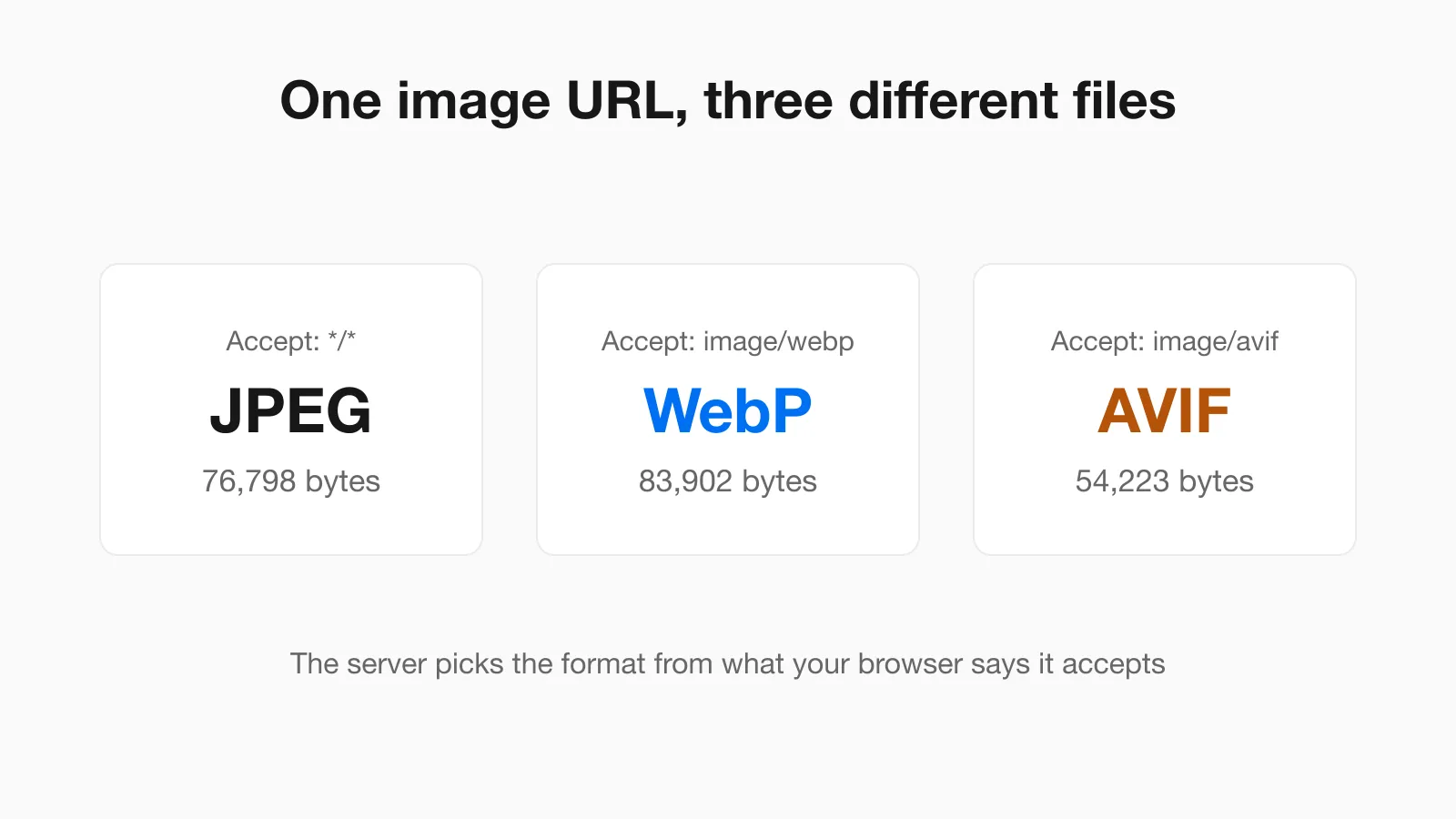
Every time a browser asks for an image it sends an Accept header listing the formats it can handle. Chrome's list for images has long included AVIF and WebP ahead of the catch-all. Many image services read that header and answer with the best format they can make, using the same URL. The file extension in the address does not decide anything, which is why a link ending in .jpg can return a WebP.
To see this directly I requested one image from the Unsplash image service three times with different Accept headers, changing nothing else:
curl -sL -H "Accept: */*" -D - -o /dev/null "https://images.unsplash.com/photo-1506744038136-46273834b3fb?w=800&q=80&auto=format"
curl -sL -H "Accept: image/webp,*/*" ...
curl -sL -H "Accept: image/avif,image/webp,image/apng,image/svg+xml,image/*,*/*;q=0.8" ...| Accept header sent | Content-Type returned | Bytes |
|---|---|---|
*/* (what curl and a bare fetch send) | image/jpeg | 76,798 |
image/webp,*/* | image/webp | 83,902 |
Browser-style list including image/avif | image/avif | 54,223 |
The response also carried Vary: Accept, which is the server telling caches that the answer depends on that header. Then I loaded the same address in Chrome 152 as a normal image and read the size the browser reported. It was 54,223 bytes, which is the AVIF. A script doing a plain fetch() of the same address got the 76,798 byte JPEG, because fetch() sends */* by default. Same URL, two files, decided by one header.
Two takeaways. First, the file you get can be AVIF, not only WebP, and many "WebP to JPG" guides never mention it. Second, the number of bytes depends on how the service encodes each format, not on the format name. In this test the WebP was larger than the JPEG. WebP and AVIF are usually smaller, but they are not guaranteed to be.
I did not run the Save image as dialog itself against this service. What Save image as writes depends on the site and the browser version, and forum reports about it disagree. What I can say from the test is that the page was served AVIF, so a file saved from what the page loaded will be AVIF.
Pick the Fix by What You Have
| Situation | Best option | Watch out for |
|---|---|---|
| One image, any computer | Copy the image, paste it into PasteDownloadApp, choose JPEG, download | None of the page data is uploaded. JPEG gets a white background where the image is transparent |
| One or many files on a Mac | sips in Terminal, nothing to install | Transparent areas come out white. File can be bigger than the WebP |
| Many files, any OS with ImageMagick | magick mogrify with -flatten | Without -flatten, transparent areas can turn black |
| The site is an image service | Add a format option to the URL if the service has one | Parameter names differ by service. I only confirmed one |
| The destination now accepts WebP | Keep the file as it is | Converting adds a second round of quality loss |
The last row matters more than it looks. If the app you are uploading to takes WebP, converting is extra work that can only make the picture worse. Convert only when something refuses the file.
Convert on a Mac With sips
macOS includes sips, and on the Mac used for this guide (macOS 26.4.1) it read both the WebP and the AVIF files. This converts one file, or every WebP in a folder:
sips -s format jpeg photo.webp --out photo.jpg

for f in *.webp; do sips -s format jpeg "$f" --out "${f%.webp}.jpg"; done
Swap .webp for .avif in the loop to convert those. Compare what came out for the same photo:
| Source | Source size | JPEG from sips | Change |
|---|---|---|---|
| WebP, 800 by 534 | 83,902 bytes | 103,327 bytes | 23% larger |
| AVIF, 800 by 534 | 54,223 bytes | 124,498 bytes | 2.3 times larger |
The JPEG is bigger because JPEG is a less efficient format, and it does not look any better. Converting a lossy file to another lossy file cannot bring back detail that the first format threw away. It only stores what is left, and then discards a little more.
Choose the JPEG Quality on Purpose
If a size limit matters, you can set quality yourself with ImageMagick. These are the JPEG sizes I got from the same WebP photo at four settings:
| Quality | JPEG size | Compared with the 83,902 byte WebP |
|---|---|---|
| 95 | 154,474 bytes | 84% larger |
| 90 | 107,787 bytes | 28% larger |
| 85 | 71,944 bytes | 14% smaller |
| 75 | 52,436 bytes | 37% smaller |
Quality 85 is a sensible stopping point for a photo that must be a JPEG and should not grow. The deeper treatment of how quality maps to size is in Image Compression Quality Settings Explained, With Real File Sizes. Note that sips and ImageMagick use different quality scales. The sips default file above measured about 93 on ImageMagick's scale, so do not assume a number means the same thing in both tools.
Why a Converted Logo Can Have a Black Background
JPEG cannot store transparency. A WebP logo with a clear background has to be flattened onto some color during conversion, and the tools do not agree on which color. I made a 600 by 300 WebP with a blue rounded rectangle on a transparent background, converted it three ways and read the top-left corner pixel of each result:
| Method | Corner pixel | Result |
|---|---|---|
sips | 255, 255, 255 | White. Fine for most uses |
magick logo.webp logo.jpg | 0, 0, 0 | Black background. This is the surprise |
magick logo.webp -background white -flatten logo.jpg | 255, 255, 255 | White. Fixed |
The same trap exists in the browser. I drew a transparent canvas in Chrome and exported it with toBlob as JPEG. Reading the corner pixel back gave 0, 0, 0, which is black. The fix is to paint the background first, which is what PasteDownloadApp does for JPEG output:
const canvas = document.createElement('canvas');
canvas.width = img.naturalWidth;
canvas.height = img.naturalHeight;
const ctx = canvas.getContext('2d');
ctx.fillStyle = '#ffffff';
ctx.fillRect(0, 0, canvas.width, canvas.height);
ctx.drawImage(img, 0, 0);
canvas.toBlob((blob) => { /* use the JPEG blob */ }, 'image/jpeg', 0.92);
If the logo has to stay transparent, do not convert it to JPEG at all. Save it as PNG instead. The trade-offs between the formats are laid out in PNG vs JPG vs WebP: Real File Sizes Compared.
Ask the Service for a JPEG Instead
Some image services let you force the format in the address. On the Unsplash address used above, adding fm=jpg returned the 76,798 byte JPEG no matter what the browser asked for. Other services use other parameter names, so check that service's documentation before copying this. If the page you are on is not an image service, there is nothing to change and you should use one of the conversion routes above. If a link will not download at all, Why Some Image URLs Won't Download covers that separate problem.
Things That Catch People Out
- Renaming does not convert. Changing
.webpto.jpgin the file name leaves WebP data inside. Some programs open it anyway, many refuse, and uploads can fail the format check. Runfile photo.jpgin Terminal if you are unsure what a file really is. - Your tab can show one format while the next visitor gets another. The
Vary: Acceptheader exists because different browsers get different files from one address. - Animated WebP is a different case. Converting it to JPEG keeps one frame at best. Use a GIF or video tool for animations.
- Screenshots avoid the problem entirely. A screenshot of the image on screen is a PNG you made yourself, at screen resolution, which is fine for a slide but not for print.
Sources and Method
- The three
Acceptheader requests, file sizes and theVaryheader: run withcurlagainst an Unsplash image URL on October 24, 2026. - The Chrome check: a normal image load and a
fetch()of the same URL in Chrome 152 on macOS, reading the byte sizes the browser reported. - Conversions:
sips316 and ImageMagick 7.1.2 on macOS 26.4.1, with sizes read from the output files. The pixel values are from the top-left corner of each result. - Not tested: the Save image as dialog against this service, and any Windows or Linux conversion tool. I do not give Windows steps here because I could not verify them.
Frequently Asked Questions
Why does Chrome save images as WebP instead of JPG?
Chrome tells the website which image formats it supports, and many sites and image services reply with WebP or AVIF to save bandwidth. The file is whatever the server sent, so a link ending in .jpg can still deliver a WebP.
Why is my saved image AVIF and not WebP?
Chrome lists AVIF as supported, and a server that can produce it may prefer it because it is often the smallest. In a test on one image the AVIF was 54,223 bytes against 83,902 for the WebP.
How do I convert a WebP to JPG without losing quality?
You cannot keep every detail, because both formats are lossy. Convert once, use a high quality such as 90 or 95, and keep the original file. Quality 85 on a test photo gave a JPEG about 14% smaller than the WebP.
Why does my converted image have a black background?
JPEG has no transparency, and some tools fill transparent areas with black. In ImageMagick add -background white -flatten before the output name. When drawing to a canvas, fill it white before drawing the image.
Can I rename a WebP file to JPG?
No. Renaming changes only the name, not the data, so many programs and upload forms will still reject it. Convert the file with a tool instead.
Related Guides
 PNG vs JPG vs WebP: Real File Sizes Compared PNG vs JPG vs WebP for quality, transparency, and file size, backed by real measured results, not general claims.
  Image Compression Quality Settings Explained, With Real File Sizes What a JPEG or WebP quality number actually changes, shown with real before-and-after file sizes.
  How to Convert a Screenshot to JPG (or PNG or WebP) How to convert a screenshot to JPG in your browser, with real tested file sizes for PNG vs JPEG vs WebP.